Tell us which account you announce your events on
Friday, November 13, 2026
Hello from the Zindies team!
This is a note for everyone who holds ZINE events.
Event announcements usually go out on Instagram or note. Going around registering the same details on various listing sites on top of that takes real effort, all the more so when you have your hands full with preparations.
At Zindies, once you tell us the account you use for announcements, Zindies goes and looks at your announcements from then on. Just post as you always do, and your events appear in the event list.
How it works
- You tell Zindies the Instagram or note account you use for announcements (how to do that is below).
- The editorial team checks it and adds the account to the places we visit regularly.
- Zindies reads new posts regularly, and when it finds an event announcement, it reads the date and time, the place, and the details.
- The editorial team checks it and adds it to the event list.
Once you are connected, all you do for the next event, and the one after that, is post the announcement. There is no need to let Zindies know each time.
On Instagram, we can read professional accounts
There is just one condition. Zindies can automatically read Instagram posts only from a "professional account" (Business / Creator). Under Instagram's rules, posts from a personal account cannot be read from outside.
Your events can still be listed if you stay on a personal account. In that case, though, the editorial team visits by hand, and some things inevitably get missed.
Only the owner of the account can switch it to a professional account.
- You can switch for free from Instagram's settings.
- Your existing posts and your followers all stay as they are.
- You can switch back to a personal account later.
If it is an account you use for event announcements, we would be glad if you would consider switching.
note accounts have no such condition. We can read them as they are.
How to tell us
Please send it through "Share an event" on Zindies. You can open it from the "+ Share an event" button on the home page or the event list, or from zindies.co/events/suggest. You can send it without being registered on Zindies.
- Paste the account (`@name` or the profile URL) and press "Check".
- Tick "This is an event or account I organize or run".
- Add your email address and press "Send to the editorial team".
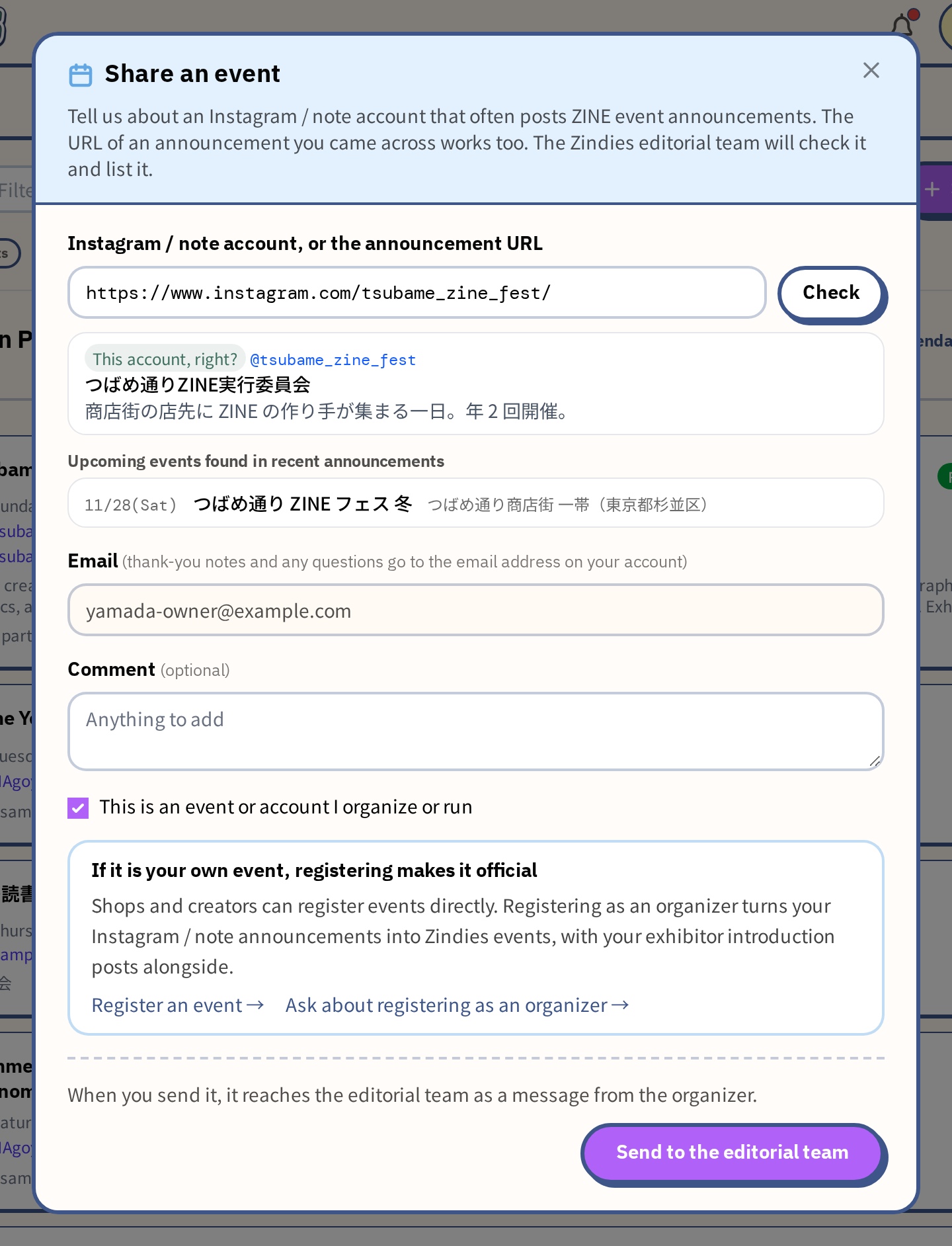
After you send it, the editorial team will follow up with you by email.
How to use the form is explained in detail in "Spotted a ZINE event? Tell us with just a URL".
A few things to know
- Nothing is published automatically. The editorial team checks what was read before listing it. It may take a little time before your event appears.
- Sometimes we cannot read an announcement. When the date, time, or place is written only inside an image, it may not be read correctly. Writing the date, time, and place as text in the body of the post (the caption) makes it reliable.
- If you notice an event is missing, please tell us. Paste the URL of that announcement into the same "Share an event", and we can list it.
- We list events related to ZINEs. We do not list other posts from the same account, such as day-to-day updates.
To begin with, just tell us one account. Your announcements can stay exactly as they are.